Inside Clew: what we built instead of Appcues and Intercom tours — and what it doesn’t do
Product tours, tooltips, modals and checklists for your web app, in our cloud or on your own servers. How it is put together, what the widget knows about your visitors, and what we deliberately left out.
If you are looking for something to replace Appcues or Intercom’s product tours, this post should tell you whether Clew fits before you sign up: what it is made of, what data it collects, and where it stops.
Why we built it
We run a few products of our own — kust.io, a user-research service, plus dmp.one and salesei.ai. All of them needed the same layer on top of the interface: walk a newcomer to the first action, point out a new feature, ask a quick question.
The established tools are cloud-only, usually priced by monthly active users, and often quoted only after a sales call. Hand-coding tours in every product was no better: each copy change became a release. So we built one engine, put it in our own products first, and then opened it up.
What it is made of
- The widget — a single dependency-free JavaScript file. It survives route changes in single-page apps built with React, Vue or anything else.
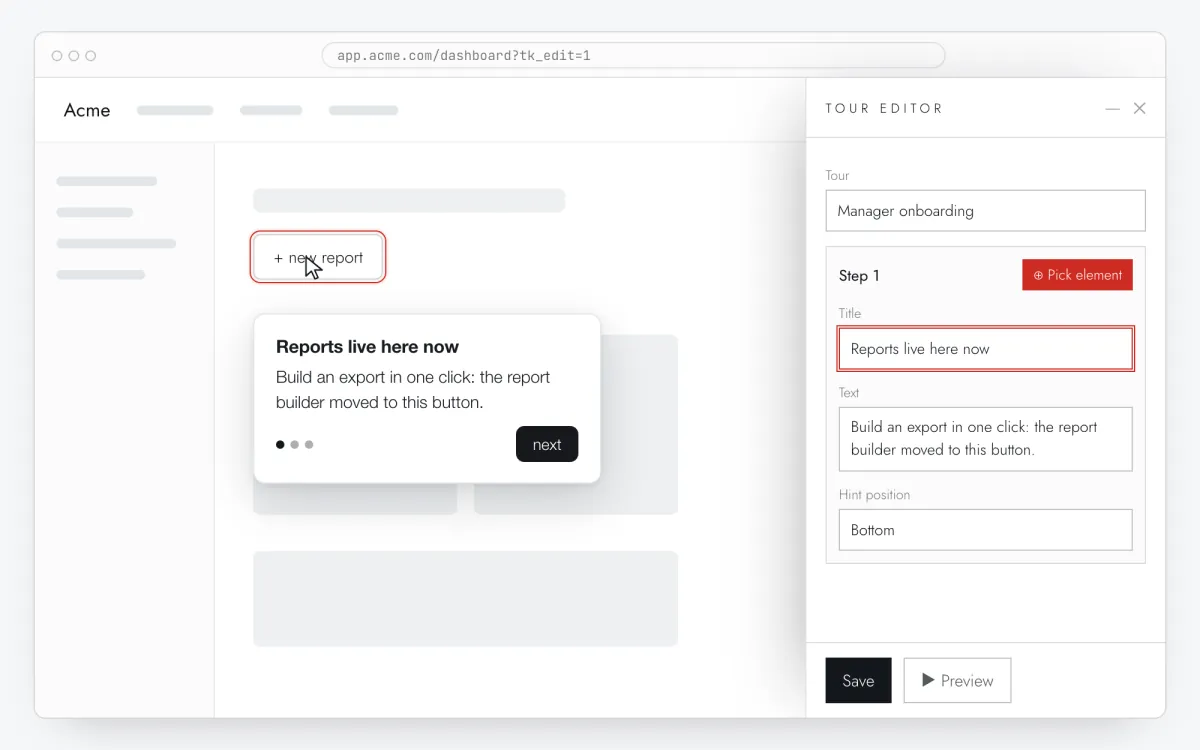
- The visual editor — opens on top of your own page through a one-time link that is valid for 30 minutes. The admin token never reaches a visitor’s browser.
- The server — one Node.js process with exactly one dependency, Express. Data lives in a built-in SQLite database.
- The dashboard — tours, per-step stats, A/B tests, a Health tab for broken steps, roles and an audit log.
The widget goes on your site as one line:
<script src="https://tryclew.io/widget/YOUR_KEY.js" async></script>The site key is public but bound to a list of domains: tours are served and events accepted only for pages on those domains and their subdomains. While the list is empty the key works anywhere — handy for a first try, but add your domain before you go live.
What the widget knows about your visitors
Less than people tend to expect. Each visitor gets a random ID in localStorage. It is used to count unique views and completions and to keep a visitor in the same A/B variant; it is not derived from anything personal, and we don’t store IP addresses.
User properties you pass through TutorKit.identify() — plan, role, days since sign-up — stay in the browser. Only their names are sent to the server, so the editor can offer them when you write targeting rules.
Add data-no-track to the script tag and the widget still shows tours but sends nothing. That is how we run it on our own site: tracking starts with TutorKit.setTracking(true) only after the visitor accepts analytics cookies.
Self-hosting, for when the cloud is off the table
Clew runs in your own infrastructure as a Docker image or a single Node process, and then visitor data never leaves your perimeter. The self-hosted license key is verified offline against an Ed25519 signature, so the server never has to call us. The code is AGPL-3.0, with a commercial license for closed modifications. More on the self-hosted onboarding page and the fintech page.
What Clew doesn’t do
- Chat or email campaigns. Intercom is first of all a support messenger; Clew replaces its product tours, not the messenger.
- Native iOS or Android SDKs. Clew works on the web: web apps, websites, customer portals.
- Email alerts about broken steps. They show up in the dashboard’s Health tab — someone has to look.
- Targeting, checklists or A/B tests on the Free plan. Free covers one site and up to three published tours and tooltips; the rest starts at Pro.
Where it runs today
In our own products first. In kust.io, according to our internal data, conversion to activation rose by 30% and onboarding completion by 50% after we launched onboarding built with Clew — the details and caveats are in the kust.io case study. In dmp.one and salesei.ai the rollout is under way with no numbers yet, and the case studies page says exactly that.
On our Russian site, tryclew.ru, Clew onboards new Clew users. How that is set up, and why there are no results yet, is in how we onboard Clew users with Clew.