Onboarding without developers: what you can do yourself, and what engineering still owns
Engineers are needed in three places: adding the script tag, putting data-tour on key elements and, optionally, passing user properties. Product managers, marketers or support can do everything else in the browser. Step by step, using Clew.
This post is about dividing the work. Engineers are needed in three places, mostly once. Everything else — picking an element, writing the copy, deciding who sees it and when — can be done without them, on the live page.
Why onboarding gets stuck in the backlog
Engineers aren’t the first to see the problem. Support explains where the export went for the third time this week. The product manager sees half of the users drop before step two.
If every hint means markup and a release, a sprint or two passes between “we noticed” and “we fixed it”. By then the interface has changed and the hint ships already out of date. Taking hints out of the codebase shortens that path and hands it to whoever owns activation.
What engineering still owns
1. Adding the script tag
One line before </body>. Without code access it can go in through Google Tag Manager or your website builder — there is an install guide for each route.
<script src="https://tryclew.io/widget/YOUR_KEY.js" async></script>2. Putting data-tour on key elements
Optional, but it prevents most breakage. When you click an element, the editor first looks for a data-tour attribute and, if there is one, uses a selector like [data-tour="invite"]. That survives any front-end rebuild.
Without the attribute, the editor builds a selector itself. It takes the id if it looks hand-written rather than generated. Otherwise it walks up the parents using the tag and at most two classes, skipping classes with hashes, CSS-module suffixes or more than 24 characters. That lowers the odds of breakage but doesn’t remove them: change the markup and the selector may stop matching.
3. Passing user properties, if you need them
To show a tour only to new users or only to admins, the widget needs facts about the user. They are passed in one call. The values stay in the browser; only the property names reach the server. Without identify() you still have rules by page URL and cookie.
TutorKit.identify({ plan: 'pro', role: 'admin', signedUpDaysAgo: 0 });What you do
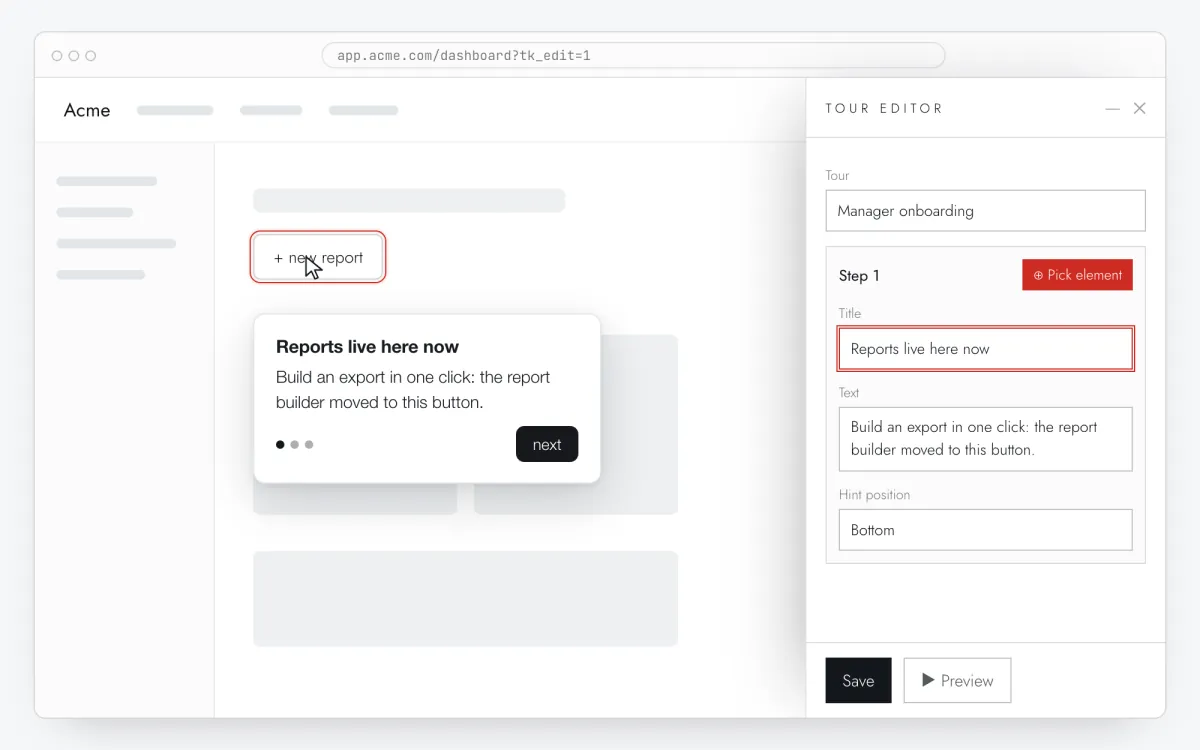
- Open the editor. In the dashboard, click “Create a tour on your site”. Your page opens with the editor panel through a one-time link valid for 30 minutes. If the tag isn’t on your site yet, you can start on the test page.
- Pick the element. “Pick element”, then click the button on the page. The selector fills in using the rules above, and you can edit it by hand.
- Write the copy. A title, an explanation, a link or an action button. The preview is right on the page.
- Decide where. Exact path, prefix, “contains” or a regular expression. Exact and prefix compare the path only, without domain or query string; “contains” and regex look at the full URL.
- Decide who. Rules on cookies or user properties: exists or not, equals or not, contains, greater or less than. Combine them with “all” or “any”.
- Decide when. Immediately; after N seconds (5 by default); on scrolling N% of the page; on a click on an element; on hover; on the Nth visit.
- Publish with the frequency set to once or always.
Details people trip over
- “Once” means that after someone finishes or closes the tour, it doesn’t come back. That is stored in a browser cookie, so another browser or a private window will show it again. A private window is the easiest way to test.
- “Nth visit” counts page loads with the widget in that browser, not sessions. Open three pages in a row and that is three visits.
- A hover hint fires when the pointer rests on the element for 400 ms. Keyboard users get it on focus, touch users on the first tap.
- Only one tour or modal is on screen at a time. If two match the page, one is shown. A checklist sits alongside and doesn’t take the slot.
- The first time you open the editor on your site, Clew remembers the domain and serves tours only there and on its subdomains. Staging visits land in your stats, so a separate site with its own key works better for staging.
How to tell it’s working
Three things in a tour’s stats deserve attention first.
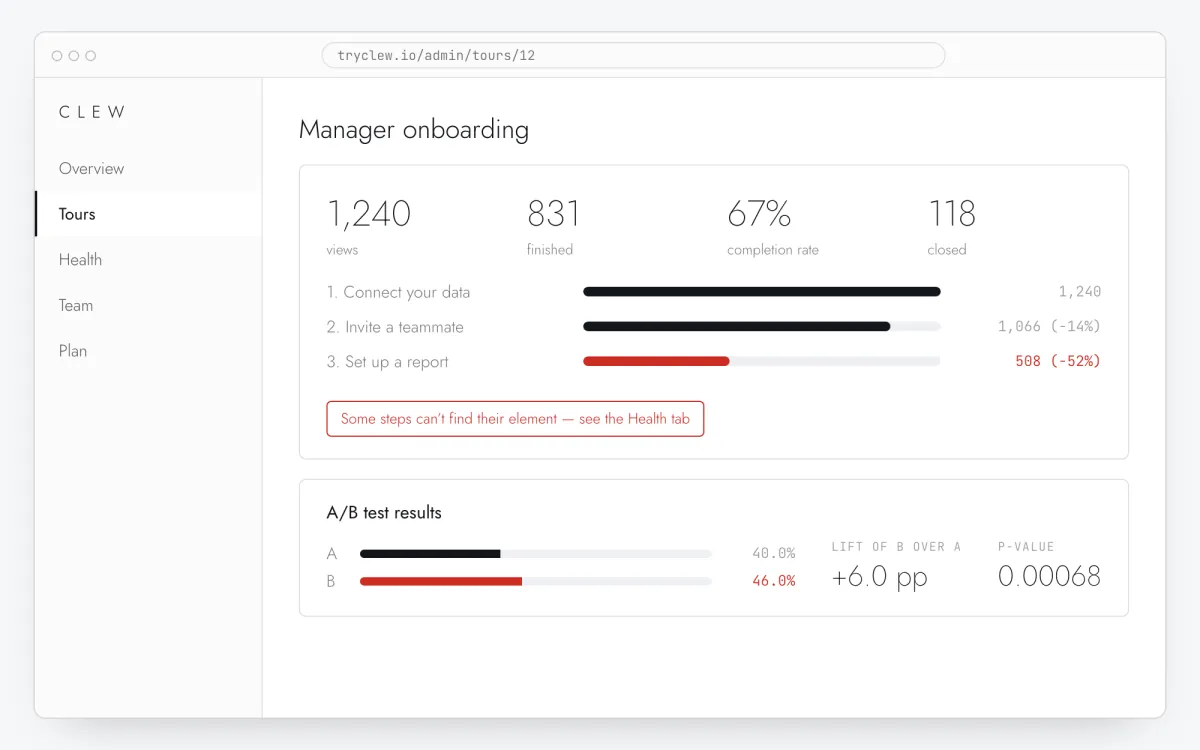
- Completion — how many of the people who saw the tour reached the last step.
- Drop-off per step. It is measured against the previous step, not the first, so you can see which step loses people.
- Broken steps. If a step’s element doesn’t appear within about 5 seconds, the widget skips the step and reports it. The Health tab lists the selector, the number of failures and when the last one happened. If the last step’s element is missing, the tour isn’t marked as seen, so people get it again once it is fixed.
When you do need an engineer
- The element only appears in a state that is hard to reproduce in the editor, such as after a payment. Ask for a data-tour attribute and type the selector in by hand.
- A checklist item should tick on a product event — “paid”, “invited a teammate”. That needs a Clew.complete('key') call where the event happens in the code.
- Stats must wait for cookie consent. Then the tag needs data-no-track, and TutorKit.setTracking(true) has to run after consent. That is how we set it up on our own site.