Clew MCP server: manage product tours from Claude, Cursor and ChatGPT
Clew runs a Model Context Protocol server, so the assistant you already work with can see your sites and tours, draft a new tour from a sentence, publish it when you say so, read its funnel and fix steps whose element disappeared. It works with Claude Code, Claude Desktop, Cursor, ChatGPT’s Codex and any client that speaks MCP over HTTP. It is part of Pro, Business, Lifetime and self-hosted Clew, and of the 14-day trial.
- Time
- ● 5 minutes
- Who does it
- Anyone with a Clew account on Pro or above
- Steps
- 6
Step by step
- Step 01
Create a personal token in Clew
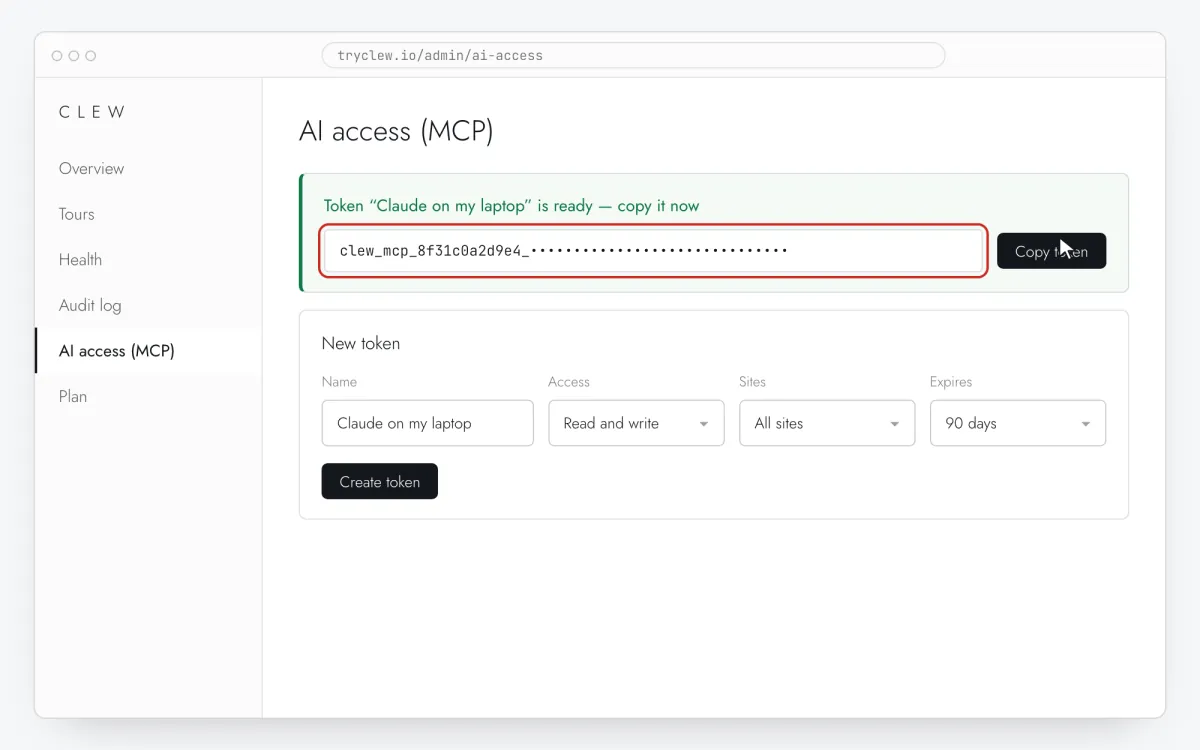
Open Admin → AI access (MCP). Name the token after where it will live (“Claude on my laptop”), pick the access — Read only or Read and write — limit it to one site or leave All sites, and choose when it expires: 7, 30, 90 or 365 days, or never. Click Create token.
The token is shown once: Clew keeps only a salted hash. Copy it now; the screen has already filled it into the client configs below the form.
A token acts as the person who created it and never more: a viewer’s token can only read, and if your role changes, the token follows. On the Free plan the screen explains which plan includes the MCP server instead of the form.
Step 1 · schematic illustration - Step 02
Connect your assistant
The server lives at
https://tryclew.io/mcpand takes the token in theAuthorizationheader. In Claude Code it is one command:claude mcp add --transport http clew https://tryclew.io/mcp \ --header "Authorization: Bearer YOUR_TOKEN"
Run
claude mcp list: clew … ✓ Connected means the token works. Cursor, Claude Desktop and Codex are just below in Set up in other clients, and the admin screen shows the same configs with your token already in them.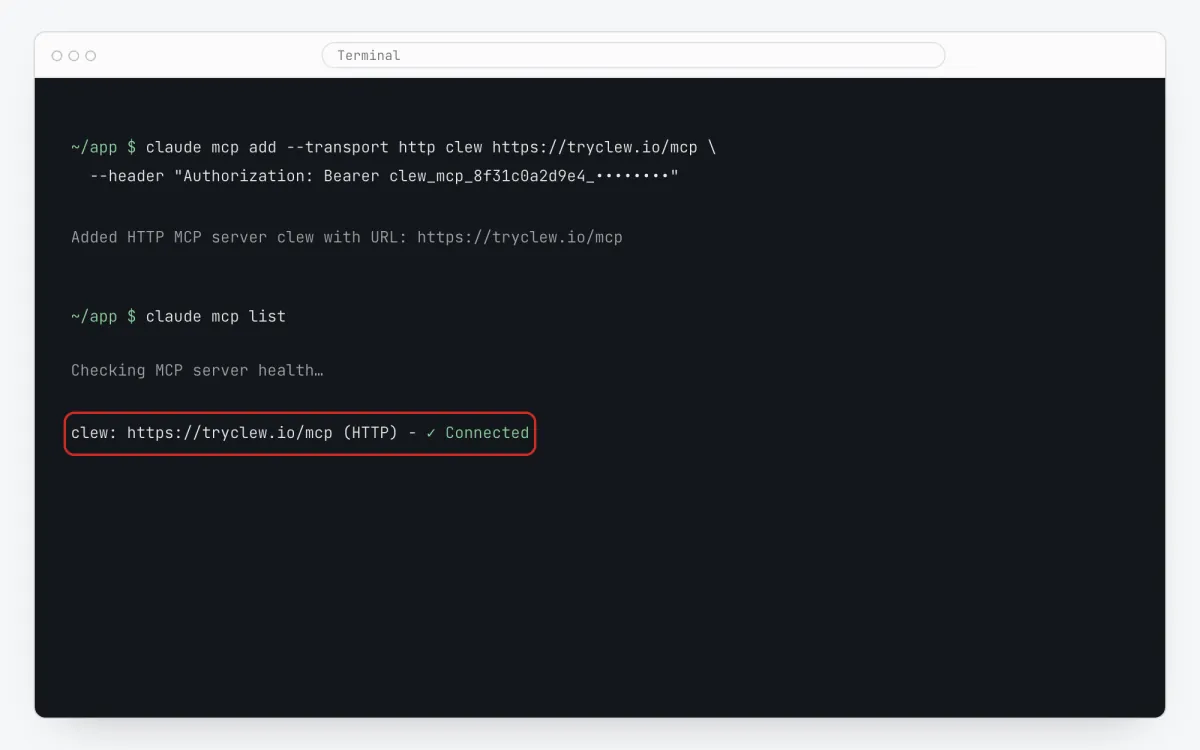
Step 2 · schematic illustration - Step 03
Ask for a tour in plain words
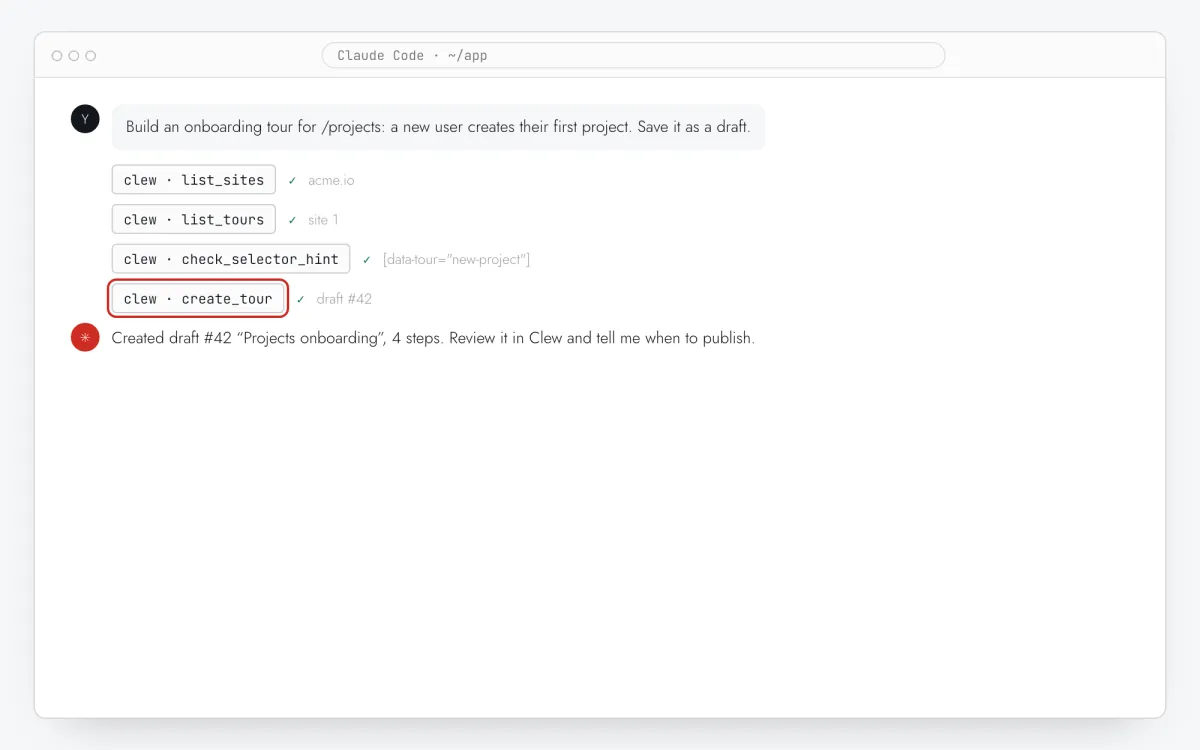
Describe the page and the goal. The assistant reads how Clew works (the server ships its docs as MCP resources), checks your sites and existing tours so it doesn’t duplicate one, turns the HTML you paste into selectors and creates the tour.
Build an onboarding tour for https://app.example.com/projects.
Goal: a new user creates their first project.
Use [data-tour] selectors, keep it to 4 steps, save it as a draft and show me.
Everything the assistant creates is a draft: visitors see nothing yet. Most clients also offer the server’s two prompts, Build an onboarding tour for my page and Find and fix broken tour steps, as ready-made commands.
Step 3 · schematic illustration - Step 04
Review the draft, then publish
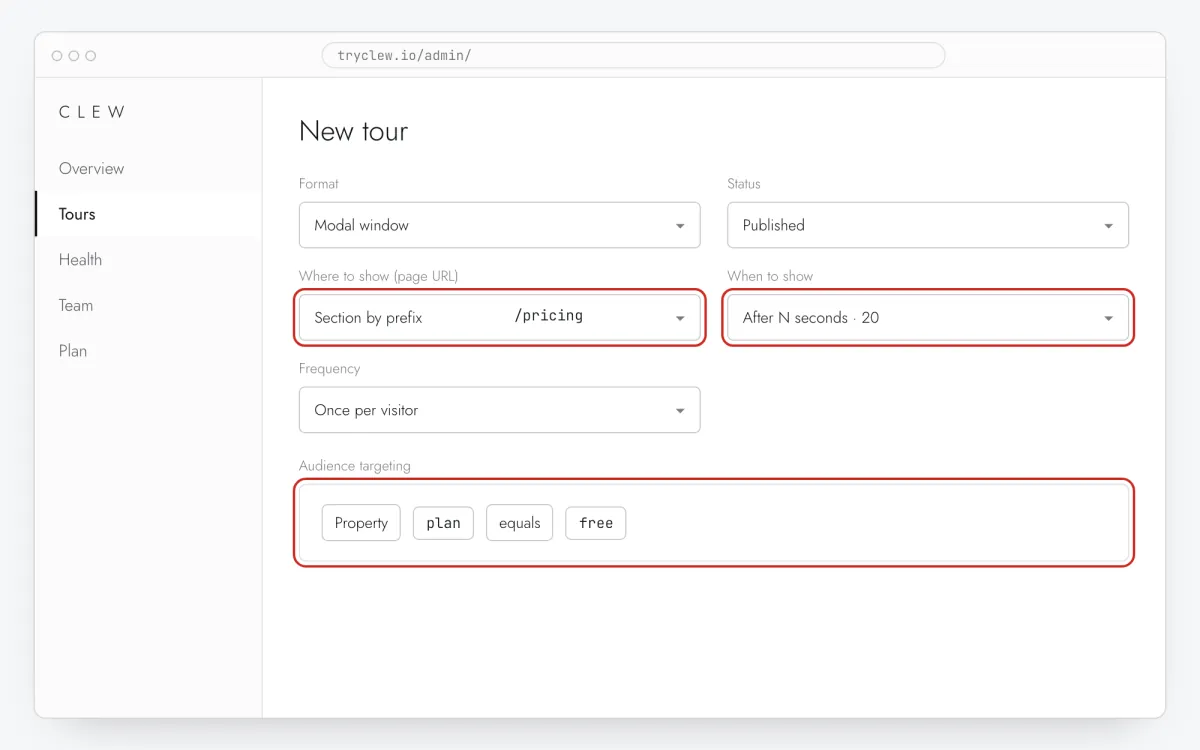
The reply links to the tour in the admin. Open it in the editor, preview it on your page, adjust the copy if you like — or keep going in the chat. When it looks right, say “publish it”: the assistant calls
publish_tour. Plan limits apply exactly as in the admin: past the published-tour limit the answer isplan_limit_tours, the same refusal the admin shows.Editing a published tour from the chat changes what visitors see right away, and the assistant is told to warn you before it does.
Step 4 · schematic illustration - Step 05
Ask about results and broken steps
“How is the onboarding tour doing?” returns viewers, completion and dismiss rates, drop-off per step and button clicks for the window you ask about, within your plan’s analytics history. While an A/B test runs, the answer includes both arms, the p-value and a verdict.
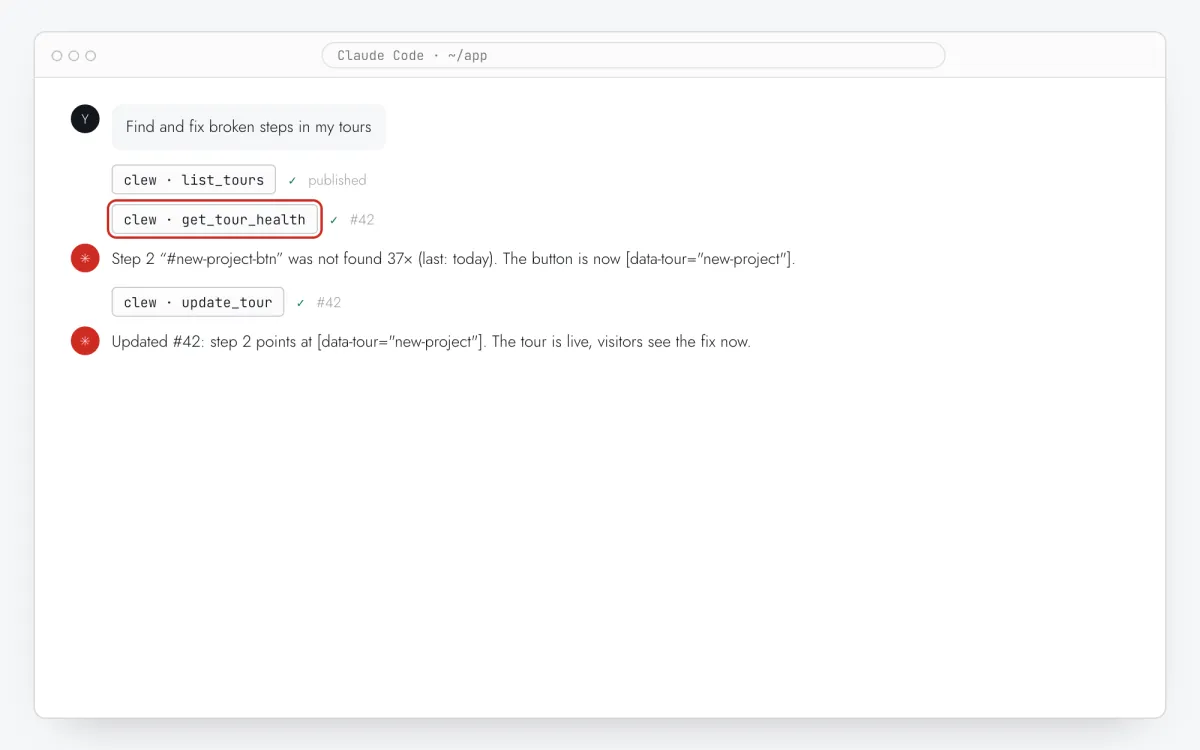
“Fix broken steps” finds steps whose element was not found on real visits — with the selector and when it was last missed — and, after you paste the element’s new HTML, updates the selector.
Step 5 · schematic illustration - Step 06
Check what the assistant did
Every change made over MCP lands in Audit log under the person and the token:
anna@acme.io via MCP (Claude on laptop). Revoke a token on the AI access screen and every assistant using it loses access on its next request.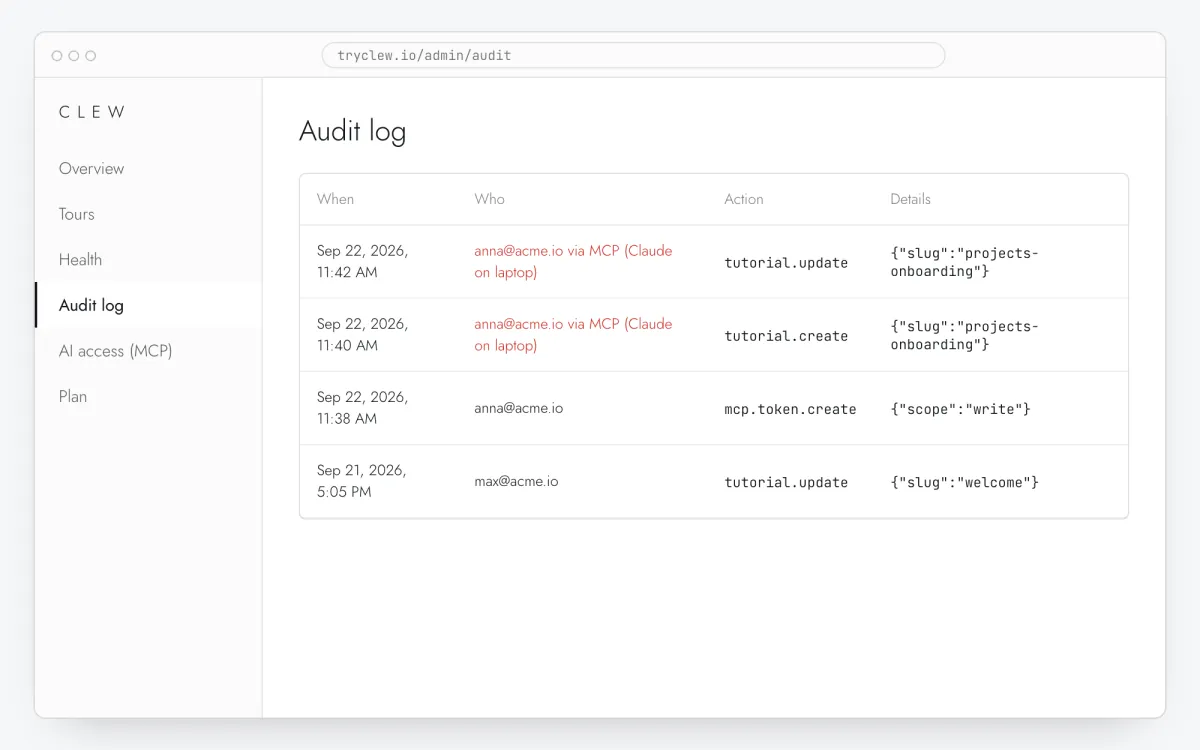
Step 6 · schematic illustration
Set up in other clients
Cursor
Paste into ~/.cursor/mcp.json (or .cursor/mcp.json in a project), then enable clew in Settings → MCP:
{
  "mcpServers": {
    "clew": {
      "url": "https://tryclew.io/mcp",
      "headers": { "Authorization": "Bearer YOUR_TOKEN" }
    }
  }
}Claude Desktop
Claude Desktop starts local servers from claude_desktop_config.json (Settings → Developer → Edit Config). Clew publishes a small bridge with no dependencies (Node.js 18+) that forwards to the remote server with your token:
curl -o ~/clew-mcp-stdio.js https://tryclew.io/clew-mcp-stdio.js

# claude_desktop_config.json
{
  "mcpServers": {
    "clew": {
      "command": "node",
      "args": ["/Users/you/clew-mcp-stdio.js"],
      "env": { "CLEW_MCP_TOKEN": "YOUR_TOKEN", "CLEW_MCP_URL": "https://tryclew.io/mcp" }
    }
  }
}Restart the app and clew appears in the tools menu.
ChatGPT: Codex
Codex, ChatGPT’s coding agent in the terminal and the IDE, reads the token from an environment variable, so it never lands in config.toml:
export CLEW_MCP_TOKEN=YOUR_TOKEN
codex mcp add clew --url https://tryclew.io/mcp --bearer-token-env-var CLEW_MCP_TOKEN
ChatGPT’s own connectors in the chat app sign in with OAuth, which Clew does not offer yet.
Anything else
VS Code, Windsurf, Zed or your own agent: any client that speaks MCP over Streamable HTTP and can send an Authorization: Bearer … header works with https://tryclew.io/mcp. Clients that can only launch local servers use the bridge above.
What the assistant can do
| Tool | What it does |
|---|---|
list_sites | Your sites, whether the widget is live on each, tour counts and the plan’s published-tour limit |
get_install_snippet | The one-line script tag with the site’s real key |
list_tours · get_tour | Tours by status and format; everything about one tour |
create_tour · create_from_template | A new tour or one of five starters — always a draft |
update_tour | Change steps, copy, page rule, audience, trigger, colours |
publish_tour · unpublish_tour | Go live or back to draft, within the plan’s limit |
get_tour_stats | Viewers, completion, dismissals, drop-off per step, button clicks |
get_tour_health | Steps whose element was not found on real visits, with the selector and when |
start_ab_test · get_ab_result · make_variant_main | An A/B test with significance and a verdict; make B the main version |
check_selector_hint | Turns pasted HTML into the selector Clew stores, with warnings about fragile ones |
Deleting tours or sites is not available over MCP on purpose. A read-only token sees only the reading tools. The server also exposes read-only docs (formats, targeting, show order, selectors, install, A/B tests) so the assistant builds tours the way Clew runs them.
Security and limits
- Personal tokens. Each person creates their own; admins see and can revoke everyone’s in their account. A token is shown once and stored as a salted hash.
- Never more than you. A token has your current role: a viewer’s token reads only, a read-only token never writes, a token limited to one site cannot see the others, and no token reaches another account.
- Plan. Pro, Business, Lifetime and self-hosted include the server, and so does the trial. If an account moves to Free, its tokens stop with the code
plan_feature_mcpuntil it upgrades. - Rate limit. 120 requests a minute per token; after that the server answers 429 with
Retry-After. - Audit. Every change is logged with the person and the token name.
Troubleshooting and FAQ
What is an MCP server?
The Model Context Protocol is an open standard that lets AI assistants call tools in other products. Clew’s MCP server gives an assistant tools such as list_tours, create_tour and get_tour_health, scoped to your account and your permissions.
Which plan do I need?
Pro or above: Pro, Business, Lifetime and self-hosted. New accounts get a 14-day trial of Business, which includes it. On Free the AI access screen shows what to upgrade to.
Can the assistant publish or delete tours by itself?
It creates drafts only, and publishing is a separate call the assistant is instructed to confirm with you first; use a read-only token if it should never change anything. Deleting is not available over MCP at all.
Does it work with ChatGPT?
Through Codex, ChatGPT’s coding agent, today. ChatGPT’s connectors in the chat app require OAuth sign-in, which is planned.
Do I still need to install the widget?
Yes. The MCP server manages tours; the widget shows them on your site. The assistant can fetch your embed line with get_install_snippet, or use one of the install guides.
Is my data used to train models?
Clew sends nothing to AI providers. Your assistant sees what its tools return — tour content and aggregate stats — under the terms of the assistant you use.
Not installed yet? Pick a route
Google Tag Manager
A Custom HTML tag on All Pages, a check in Preview, publish. For sites that already use GTM.
Open guide →Vibe codingAI coding assistants
One prompt for Claude Code, Cursor, Lovable, Bolt.new, v0 and Replit that puts the line in the right root file.
Open guide →No-codeWebsite builders & CMS
WordPress, Webflow, Shopify, Wix, Squarespace, Framer, Tilda or plain HTML: where the head code field is and what to press.
Open guide →CodeReact and Next.js apps
One line in index.html or the root layout, identify() after login and stable data-tour anchors. Vite, Create React App, Next.js.
Open guide →